Product · 2026
A logo tracer that runs in the browser and draws with close to the nodes a designer would use.
Outcome
People in 41 countries ran 622 traces and 68 signed up, with no ads.
- Challenge
- Traced logos looked right but carried 36 times the nodes a designer would draw.
- What I built
- A browser tracer scored against real vector files, with tools to finish a trace by hand.
01 / 08
Why I Built It
Customers kept sending us logos as pixels, and a clean print needs vectors. So I built the tool I wished we had.
I work in a graphics department that custom-prints logos onto hi-vis workwear and first aid kits. To print cleanly, we need each logo as a vector file, made of shapes and curves rather than pixels.
Customers often sent a PNG or JPG instead. Sometimes we could ask them for the vector file, but often they didn't have one.
That left two options: retrace the logo by hand, or try Illustrator's built-in Image Trace, which is honestly a disgrace.
So I built VectorizerKit for the job in front of me, and every part of it had a purpose. But I figured plenty of other print shops and designers were hitting the same wall.
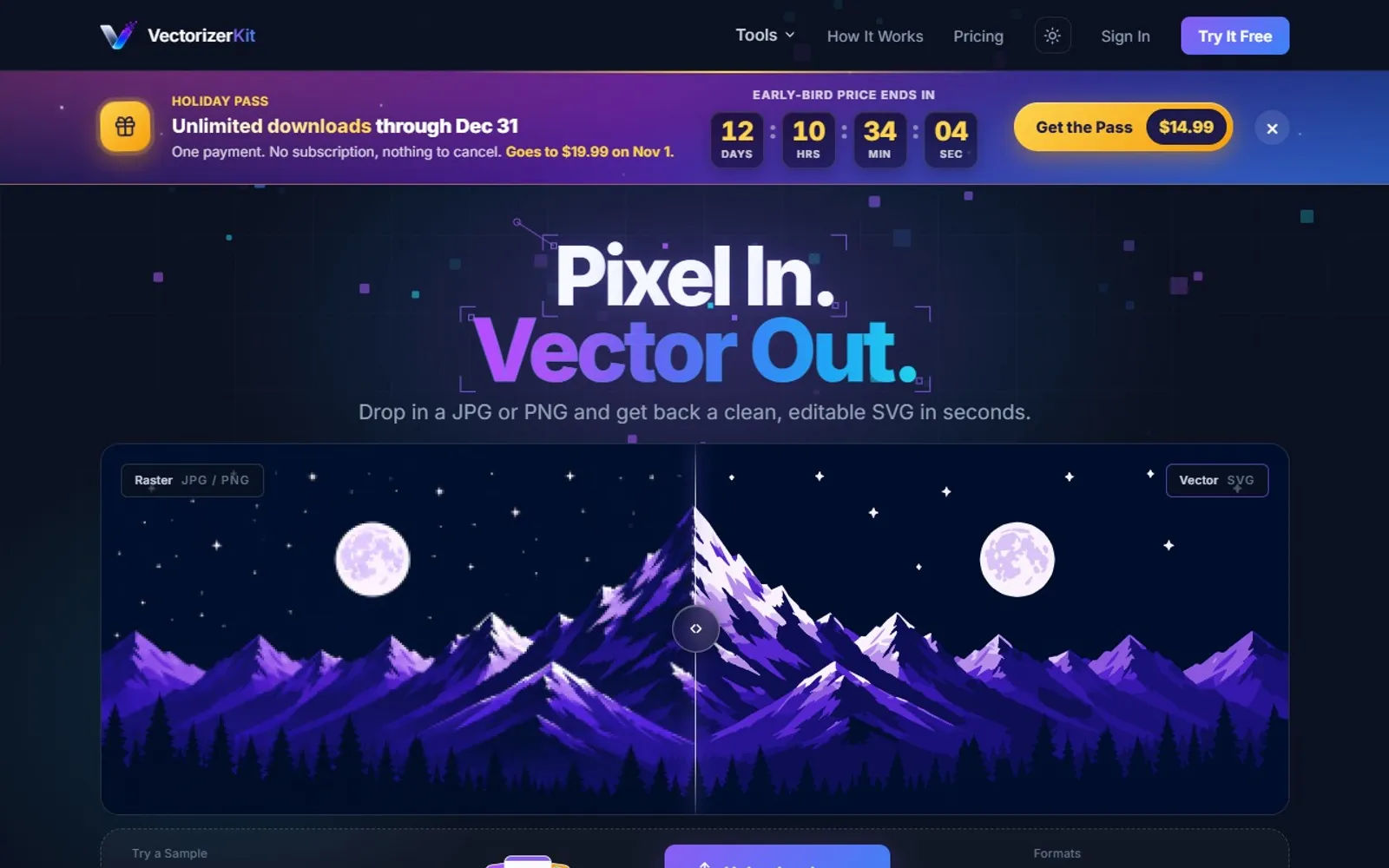
The same gap shows up with AI art. Tools like ChatGPT and Midjourney make detailed designs, but only as pixels. The homepage shows the whole trip in four steps.
Describe a design to ChatGPT, and it draws one.
Drop the image into VectorizerKit, and it comes back as vector paths.
Download the SVG and send it to the print shop.
It prints with crisp edges on the shirt.
Making that promise hold up was the real work, starting with how good a trace really was.
02 / 08
Right Pixels, Wrong Geometry
My early traces looked finished. Checked against real vector files, they had 36 times the points a designer would draw.
VectorizerKit turns a PNG or JPG logo into a vector, right in the browser. The early traces matched the image, so by eye they looked done.
But a vector isn't just a picture. Each curve is shaped by a handful of points, and those points are what a designer edits. On a bad trace, a curve that needs four points has hundreds.
So I built an answer key. I took logos that already exist as real vector files, turned them into pixels, traced them back and compared. My traces had 36.6 times as many points as the originals.
The pixels already matched, so accuracy wasn't the problem. The engine was following every jagged pixel edge instead of drawing the shape. I added a step that redraws each outline with as few curves as possible, staying within a quarter of a pixel.
That brought it down to 2.6 times the answer key, with no loss in accuracy. Across 23 test images, files had 3.2 times fewer points and came out 9.1 times smaller, and none got worse.
Night Shift, one of my own sticker designs, traced in the browser.
Show Nodes puts a dot on every point in the vector, so you can judge the drawing and not just the picture.
Clean shapes exposed the next weak spot: small text.
03 / 08
Small Text
Small taglines came back as smudges, so I built an answer key out of fonts and tuned the text tracing against it.
Logos often carry a tagline only a few pixels tall. To measure how well those traced, I built a second answer key from five free fonts, from plain lettering to handwriting.
Each test starts as perfect letter shapes, then gets roughed up on purpose: shrunk, blurred, saved as a low-quality JPEG and tilted. The first results were humbling. Only 4 of 20 kept the right number of letters, even though they looked close.
So text got its own tracing step, tuned against that key. It traces letters finer than a single pixel and keeps straight strokes straight. Small holes, like the inside of an e, stay open. Corners that blur rounds off get rebuilt, and text curved around a badge is followed.
A test wordmark 600 pixels wide, with tagline letters about 9 pixels tall.
Its traced outlines, drawn over the original.
Up close, the tagline comes back as clean, separate letters.
In many real files, though, letters under about 10 pixels have already merged in the image itself, and no tracer can pull them apart.
04 / 08
Fixing Tiny Logos First
Tiny images don't hold enough detail to trace. I trained an AI model to fill it back in, then found an existing one that did it better.
Some logos arrive tiny, like a customer badge only 150 pixels wide. There just isn't enough detail in the image for any tracer to work with.
The fix is to enlarge and sharpen the image with AI first, then trace that cleaner version.
I started by training my own model on about 6,000 examples of logos, icons and taglines. It helped a little, then stopped getting better.
So I decided to use an open-source AI model made for line art to help rebuild the detail. I ran the same tests on both, and it did much better.
On one real logo, the word PARTNERSHIP traced as broken fragments. With the image enlarged first, it came back as clean, readable letters.
My own model had taken a lot of work, but the other one was clearly better, so that's the one I used. It runs right in your browser, and only when a logo is too small to trace well.
My Northpoint mark, shrunk to 160 pixels and dropped in.
The app enlarges it 4× first and tells you it did. Up close, the blurry original sits beside a crisp vector.
Deciding what counts as flat art turned out to be a problem of its own.
05 / 08
Flat Art or Photo
A computer can't always tell a logo from a photo, so the app shows which one it picked and lets you switch.
VectorizerKit traces two kinds of images differently. Flat art, like most logos, is a few solid colours with sharp edges. Anything with soft shading, like a photo, needs a different approach.
The app picks one automatically, and a wrong pick is costly. On one poster, it made the file more than ten times as complicated.
I tried to make the automatic pick smarter, but some photos and logos look almost the same to a computer. Across 99 real images, a photo and a logo could score nearly identically.
So instead of hiding the choice, the app shows it. The top of the panel says which way it went and what to look out for, and one click switches it.
Rooftop Garden has soft shading, so Auto picks Photo and says so.
One click on Flat Art traces it again, with about 3,100 points instead of 13,500.
Reset To Auto puts it back the way it started.
Even a good trace needs a person to finish it, so the workspace became an editor.
06 / 08
Finishing the Result by Hand
Every trace needs a little cleanup, so you can fix colours, backgrounds and small symbols right in the browser, and undo any of it.
A trace can come back with two shades where the logo should have one. Dragging one colour onto the other merges them, and tapping the merged colour splits it again.
Each colour is a bubble, sized by how much of the logo it covers.
Dragging one orange onto the other merges them, so the fox's two oranges become one.
Tapping the merged bubble shows what's inside, and Split All takes it apart again.
You can also pick out a single shape, or drag a box around several, then recolour or delete them. Removing a background takes one click, and Undo brings it back.
A test badge, traced with its white page behind it.
Remove Background takes the page away in one click, and leaves the cream sky and lake inside the badge alone.
Undo brings everything back.
Trademark symbols needed their own fix. A ® in a logo is often only 8 to 12 pixels wide, too small for any tracer to read. So you select it, choose ®, ™ or ©, pick a thickness that matches, and the app swaps in a clean one.
WASIP's Redi-Medic logo at small size. Its ® is about 12 pixels across, so the R inside it traces as a blob.
Select mode picks the mark's pieces, and the rest of the art fades back.
Fix ® ™ © previews a clean mark in its place, and Replace swaps it in.
Finished files download as SVG, PDF, EPS or DXF. And because the tracing runs on your own computer, your artwork is never uploaded anywhere.
A working tool still had to become something people could pay for.
07 / 08
Building the Business Alone
In about two weeks, on my own, I built everything that lets people sign up and pay.
From about July 20 to August 4, I built the accounts and payments myself. People sign in, and each account can only ever see its own data.
Downloads use credits. Every credit added or spent is recorded for good and never edited, so a balance can always be checked. Credits that expire soonest get used first.
Payments run through Stripe, for an unlimited plan or one-time credit packs. Every payment counts exactly once, failed ones are retried and tax is calculated properly. A separate check catches anything that slips through.
Then came the other pieces a real product needs. There's a paywall at the download button and sign-in that keeps your work. There are also analytics, legal pages, a blog and pages built to be found in search.
In late September I opened the site to search engines and waited to see who would come.
08 / 08
Who Found It
With no ads at all, people from 41 countries found it and started tracing.
There was no paid advertising, just a few Reddit replies from my own account. Visitors came from 41 countries, led by Canada and the US.
Some arrived on comparison pages I wrote for search, like VectorizerKit against Vectorizer.AI or Illustrator's Image Trace. Those are the tools people were already trying.
In about 12 weeks of analytics, 276 people visited, and two thirds came on a computer. 128 of them ran 622 traces, and 68 people have signed up.
The numbers also showed where people dropped off. 128 people traced a logo, but only 40 downloaded one.
So I added prompts to catch people at that moment. Signing up to download now takes an email and a six-digit code, with nothing to remember. When free downloads run out, the app zooms into your own logo beside its vector, so you can see the difference before paying.
If someone is about to leave without saving their vector, a one-time offer appears. It shows at most once a visit, never in the first 20 seconds, and always with a plain “No thanks” button. A holiday pass with a countdown banner gives people a reason to buy now.
Those went live on October 13, and the offer has appeared for 42 people so far. It's still too early to say how much they've helped.
Those numbers are small, but they're real people with the same problem I had at work. Every hard part gave way the same way. I measured what people actually see, then let the results decide, even when that meant setting my own model aside.
Next case study
A one-person studio losing its days to intake, research and invoices.